Session Log
Fill this out once for each live session you teach, on the same day it takes place. It records who attended and where the recording lives, so there is one place to look for both and families can get back to a session they missed.
After the Session
-
1
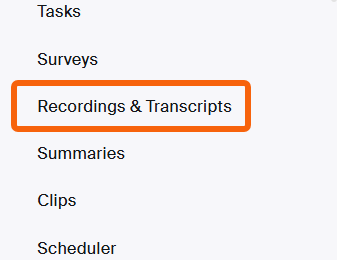
Open Recordings & Transcripts in Zoom
Cloud recordings usually finish processing within twenty minutes or so of the session ending.
-
2
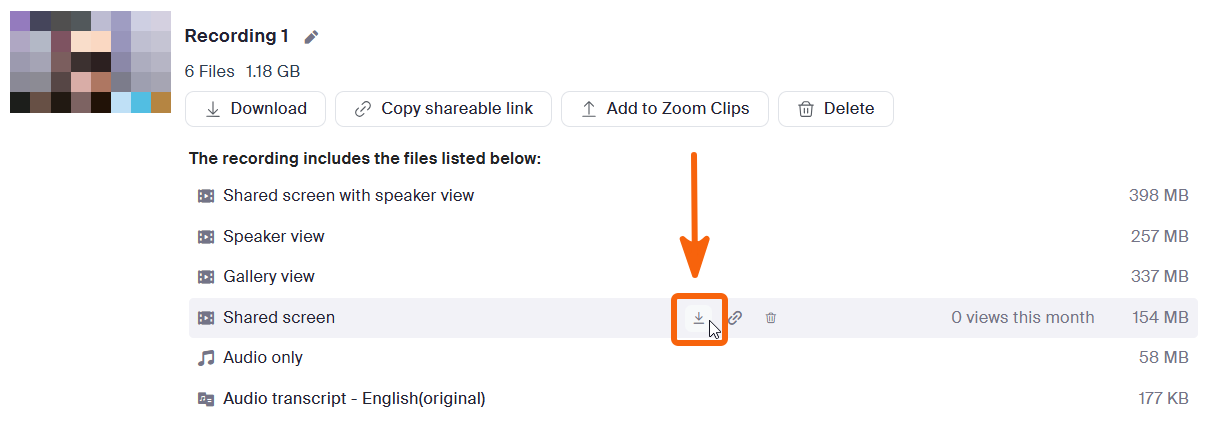
Download the Shared screen file
Open the recording and download the row labelled Shared screen. Not Shared screen with speaker view, not Speaker view, not Gallery view.
-
3
Upload it to your Google Drive
Anywhere in your own Drive is fine, and you can name it whatever you like. A shortcut gets filed into the right course folder for you once you submit the log.
-
4
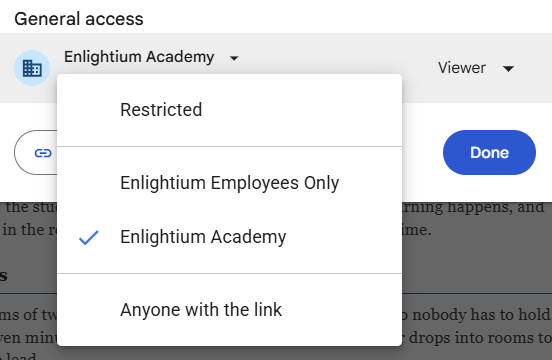
Set General access to Enlightium Academy, then copy the link
Not Enlightium Employees Only — students are on a separate domain and would not be able to open it.
-
5
Submit the log
Use the button at the top of this page, and paste the Drive link when it asks. You will also need your attendance count, the Ignitia enrollment total, and the assignment numbers you covered.
What the Form Asks
| Question | What it wants |
|---|---|
| Session date and grade level(s) | The date taught. Check every grade that was in the room — combined sections get both. |
| Session type | What kind of session it was. Hub sessions then ask which hub and which week. |
| Course | From the dropdown. If your course is missing, choose Other and name it in the summary. |
| Students present | A head count of who actually attended. |
| Ignitia roster total | The enrollment figure Ignitia shows for the course. Enter N/A for hub sessions, chapel, and study hall. |
| Follow-up needed | Names only, and only where an absence or late arrival needs someone to act. Blank is a legitimate answer. |
| Recording link | The Google Drive link. If there is no recording, say so and say why. |
| Assignments and summary | The Ignitia assignment numbers you covered, as applicable, then one or two sentences on what the lesson or hub session did. |
What to Do If…
The recording is still processing
The recording never appeared
You uploaded the wrong file
The session was co-taught
A substitute covered it
Nobody came
Purpose
Attendance at Enlightium Prep is not compulsory, which makes the question of who actually turns up a real one. The school needs to know how well attended each kind of session is — instructional, workshop, study hall, hub, chapel — because that is what makes it possible to respond. A slot that consistently sits empty can be moved. A session worth attending can carry credit or another incentive. A session families do not yet know about can be promoted. None of those decisions can be made from impressions.
The recording links do the second job. Each submission files a shortcut into its course folder, so a term's sessions gather themselves in one place instead of being hunted down across individual Drives when someone needs them. The assignment numbers and your sentence or two make that archive searchable later, when the question is what a course covered in October.
Names in the follow-up field go to intervention. That field exists so a student who is quietly disappearing gets noticed in the same week rather than at the quarter mark.